
When Should You Change the Password?
You don’t have to wait for trouble to reset it. Still, here are a few moments when it’s smart to do so:
- You forgot the password, or the app keeps showing invalid credentials.
- The account shows weird logins or transactions you didn’t make.
- You’ve shared the password earlier and now want it private again.
- You simply want a clean start for security.
Changing your password every few months is very important and is a good practice. It helps you stay updated. In this way, no one can use your account in the wrong manner.
Sometimes when you enter a password multiple times, your account can be locked. That is why you also need to know how to unlock your account easily.
What Are the Steps to Reset the OK Win Password?
The process looks almost the same on the app and on the website. Do whichever feels easier.
Step 1: Go to the Login Screen
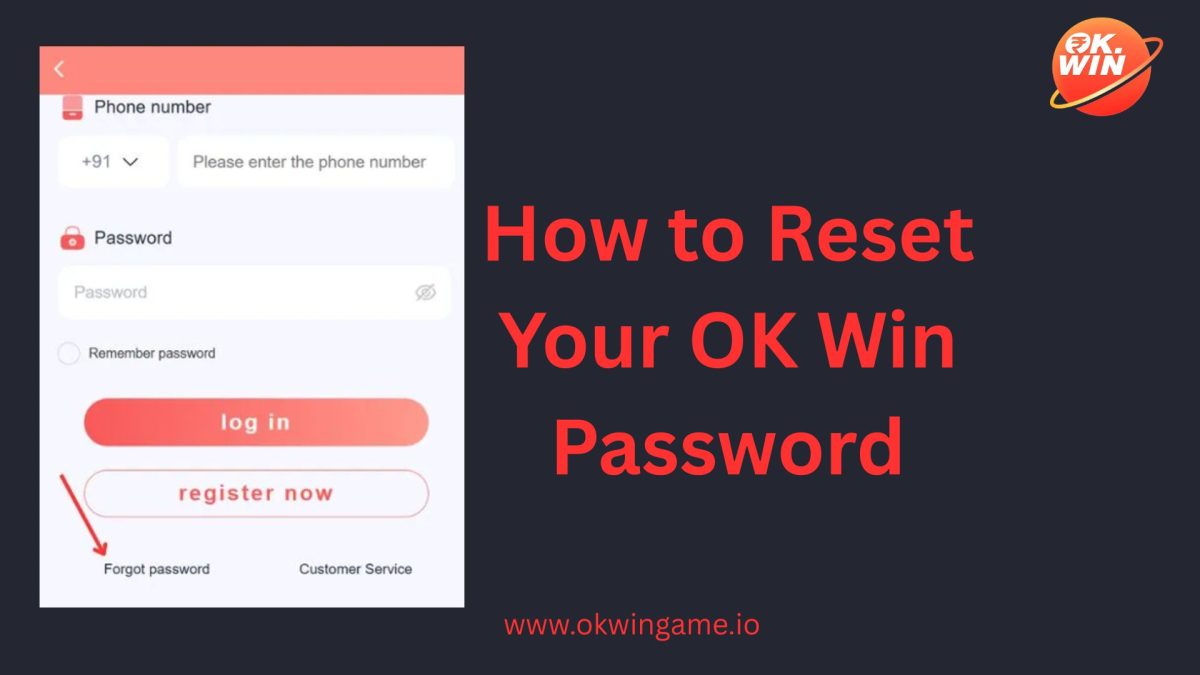
Go to the Ok Win homepage on the website or open the mobile app. You’ll see the boxes asking for your number or email, and password.
Step 2: Tap “Forgot Password”
It’s a tiny link under the login button. Tap it, and a reset page will appear.
Step 3: Enter Your Registered Information
Just enter your mobile number or email ID that you used while doing registration onOkwin platform. This will help the platform know what your account is.
Step 4: Check Your Phone or Inbox
You will then get an OTP on your registered phone number or email ID. Wait for a few seconds or check your other spam folders in your email.
Step 5: Set the New Password
Now make a fresh one. Keep a combination of letters, numbers, upper case letters, etc. and make the password at least eight characters long.
Step 6: Confirm It
Type it again to be sure there’s no typo. Hit confirm. You can now log in to the Ok Win platform using your new password and start playing. In case you are not able to reset, you can contact Ok Win support and share your Ok Win game ID.
What if You Are Not Able to Reset Your Password?
It’s rare, but sometimes the reset acts up. Here’s what usually fixes it:
- No OTP? Wait a bit or double-check that your internet’s fine. Try again after a short pause.
- Email not found? You might’ve registered with your number instead. Try that.
- Code expired? They do that fast for safety, just get a new one.
- App glitching? Update it or switch to the website version; that often sorts it out.
If none of this helps, scroll down the site and go to Ok Win customer support. Send them your registered details. The support team normally verifies and resets it manually. You can also explore related features like the OK Win gift code to enhance your overall experience.
How to Make the Password Strong?
Don’t go for short and easy passwords. These passwords can be easily used by anyone.
Here’s a quick way to make a strong password:
- 8 to 12 characters minimum
- At least one number, one symbol, one capital letter
- Skip personal info (no names, birthdays, phone digits)
- Change it every few months
- Store it in a password manager app if you keep forgetting
Little tweaks like these make a big difference for account safety.
How to Keep Your Ok Win Account Safe?
Resetting solves the login issue, but staying safe is a longer game.
Once you’re back in:
- Do not share your password or login details with anyone.
- Avoid sketchy links pretending to be OK Win.
- Your contact information should be updated properly.
- Always enable two-factor authentication if it is there in the app.
These habits take seconds but protect your wallet and progress.
Conclusion
Forgetting the Ok win password can make you sad, but do not worry. With these easy steps, you can reset your password with ease and start your gaming experience. A few clicks, a new password, and you can just start playing and having fun on this amazing platform.
The actual trick is to keep your password safe. Make it strong, use personal login, official links only. If you do all these, then you don’t have to worry about anything else.